Rummy Safety: Avoid Screen Sharing During Account Actions
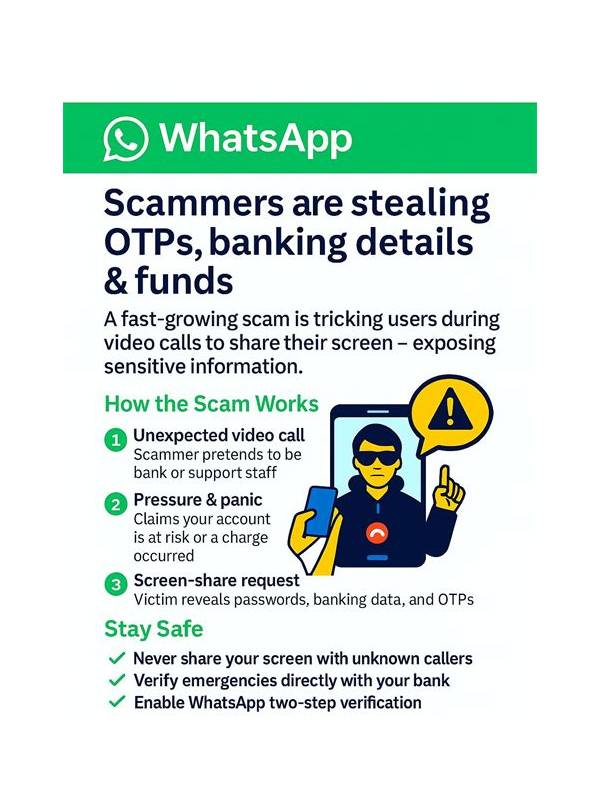
Screen sharing can be useful for explaining a game layout, but account actions require extra caution. Passwords, one-time codes, payment details, identity documents, and withdrawal screens should remain private. A helpful person does not need to see sensitive information to explain a rule or troubleshoot a general display issue.
Before sharing a screen, close account, wallet, and notification panels. Disable previews that could reveal messages or codes. If you need technical help, share a cropped image of a non-sensitive error or describe the problem in words. Never read a verification code aloud or type it while another person is watching unless you are using an official, trusted support process that does not request the code.
Treat unexpected requests as unverified. Someone who claims to be support may ask you to install remote-control software, move funds, or share a login screen. Stop the conversation and contact support through the app or website you opened independently. Do not use links or phone numbers supplied only in a chat message.
After sharing has ended, review what was visible. Sign out of temporary sessions, close the meeting, and check active account sessions if the platform offers that feature. If you believe credentials or payment details were exposed, use the official security controls promptly and contact the relevant provider. Do not continue playing while trying to resolve a serious account concern.
The safest design is separation: discuss strategy on a clean table, handle account actions alone, and make payment decisions away from game pressure. Small privacy habits protect both your account and your ability to enjoy the game on your own terms. Small privacy habits protect both your account and your ability to enjoy the game on your own terms.
If a friend is helping with a harmless layout problem, ask them to guide you verbally while you operate the app yourself. For a support request, redact names, balances, reference numbers, and notification text before sharing an image. Check the recipient and channel independently. These steps may feel slower than handing over the screen, but they preserve control over the actions that matter most. Strategy advice can wait; account security should not depend on another person’s urgency. This boundary applies to shared household devices as well. Lock the screen before opening a wallet or verification page, use separate browser profiles where appropriate, and sign out when finished. Avoid saving credentials in a browser that other people use. These are ordinary privacy controls, not signs of mistrust. They reduce accidental exposure when a device is borrowed, repaired, or shown during a support conversation.